

Summary
MTF Data Assistant is MTF’s new product: you ask a question about your SAP Business One data, typed or spoken, and within seconds you get the answer with the figure, the chart and, when needed, the Excel file. Then you keep asking, as in a conversation. It runs in the browser and in the iPhone and Android app. The data stays in the company: a small service on your server reads SAP B1 read-only, and customer names never reach the artificial intelligence. There is a free 30-day trial with 100 questions, starting from a sample company before you even connect your own SAP.
One thing to know up front: MTF Data Assistant works in Italian. Questions and answers are in Italian, because it is built for Italian companies running SAP Business One.
The report is there. But you can’t have a conversation with it
Over years of SAP Business One projects, the owners of the companies we work with have told us the same thing in a hundred different ways: the data is in SAP, so is the report, but you need to know how to use it. Open the selection criteria, pick the dates, export, filter in Excel. And when the figure finally arrives, the next question (“and compared with last year?”, “and just for that customer?”) starts the whole round again.
So questions about the numbers wait. They wait for the finance team, for the controller, for Monday. Not because the data is missing, but because getting it out costs someone time.
We built MTF Data Assistant so that the people who decide get the answer when the question comes to mind, without asking anyone. It does not take work away from the people who know SAP B1: it takes away the repetitive extractions.
A question in Italian, the answer in seconds
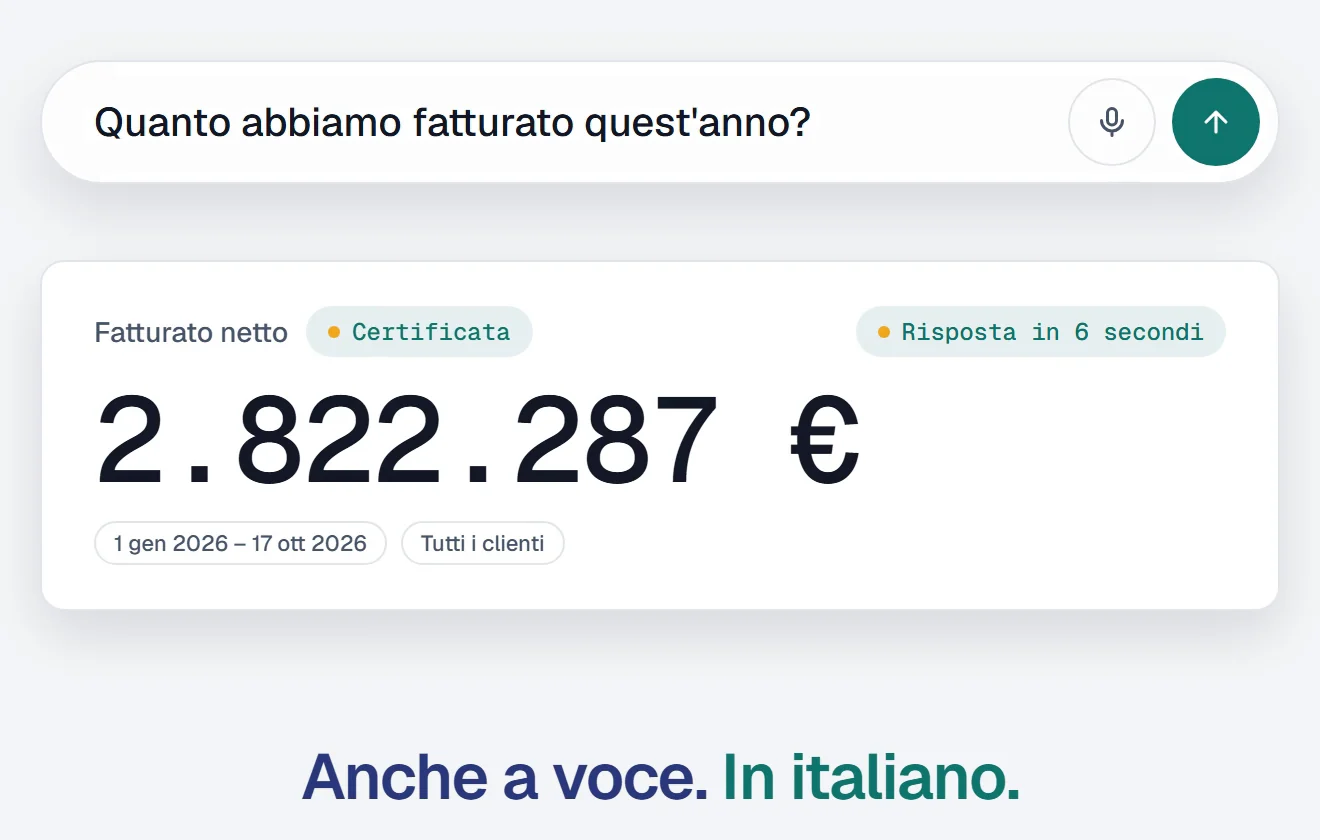
You ask the way you would ask your finance manager: “Quanto abbiamo fatturato quest’anno?” (how much have we invoiced this year?). Or you dictate it, tapping the microphone. The answer comes back with the figure, the period covered and the filters used, so it is clear straight away what it refers to.
Each department has its own questions, and MTF Data Assistant handles them all the same way:
- Owner: “How are we doing compared with last year?”
- Sales: “Which customers bought in 2025 but not in 2026?”
- Finance: “Who has invoices more than 60 days overdue?”
- Warehouse and purchasing: “Which items are below minimum stock?”
- Production: “Which production orders are late?”
- Management: “How much do the top 5 customers weigh on revenue?”
From the first figure, you keep asking
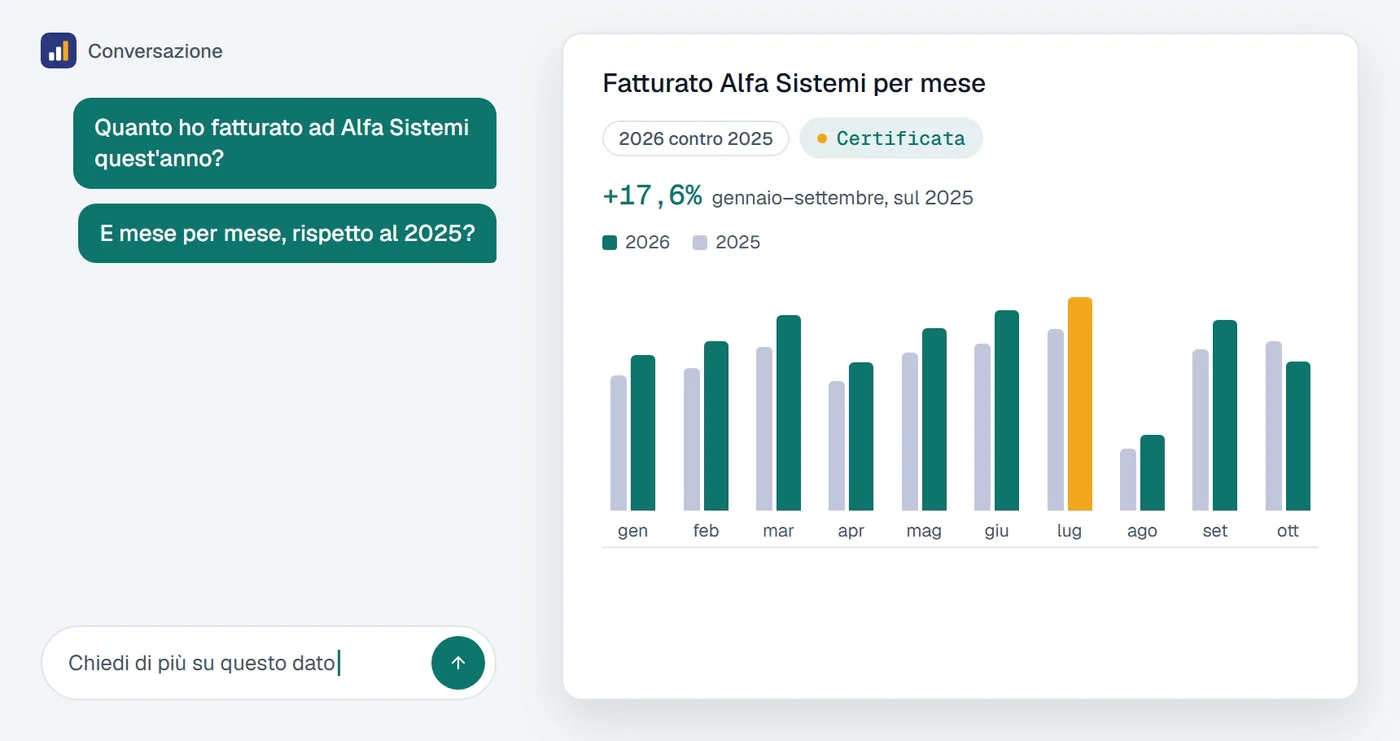
This is the difference from a report. After the first answer you don’t start from scratch: you add a sentence. “And month by month, against 2025?” and the chart appears. “Only the invoices still open” and the list appears. Each question builds on the previous one, like talking to a colleague who has the numbers at hand.
The hardest question: how much cash will we have
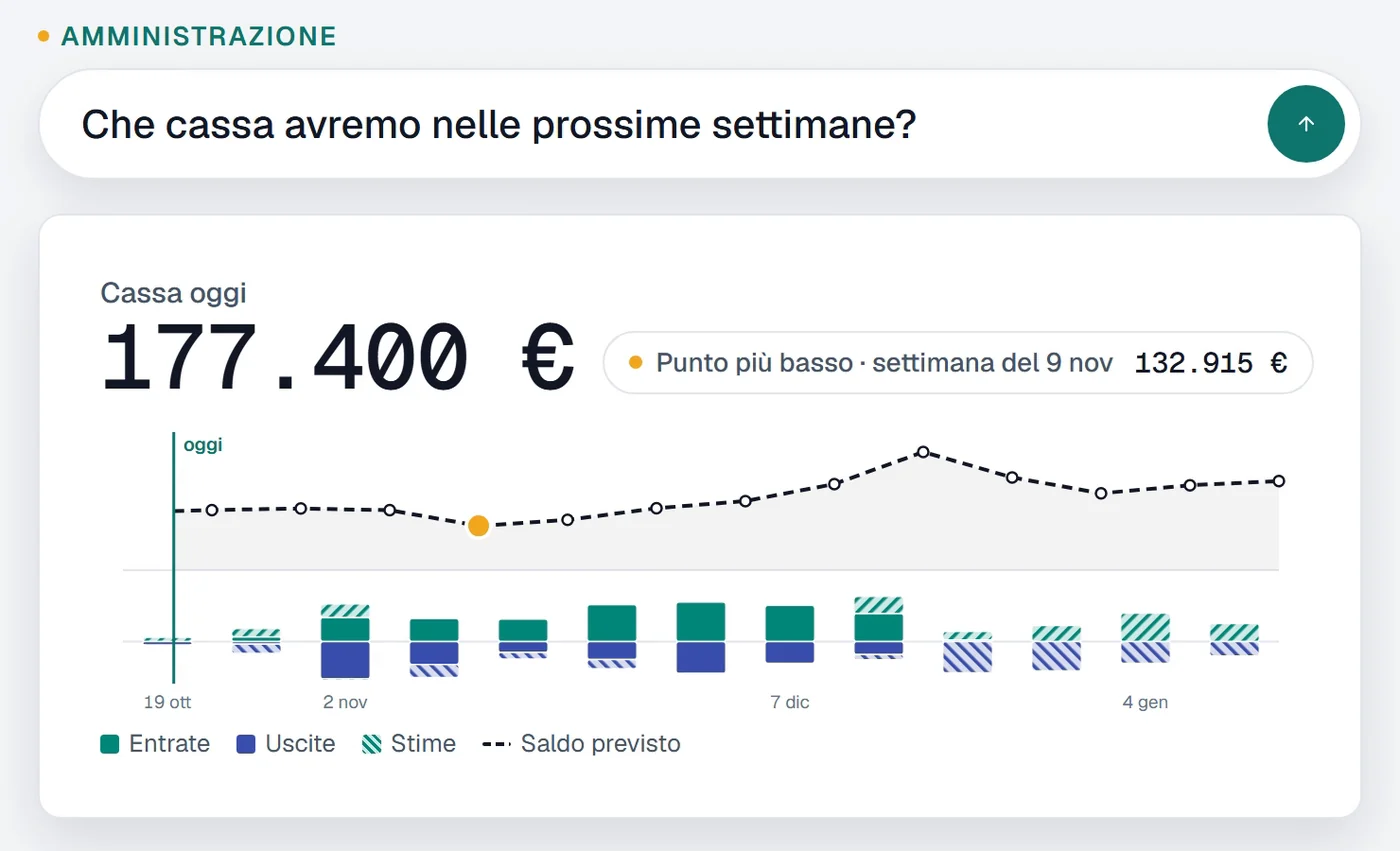
“How much cash will we have in mid-January?” is the question owners ask most often, and the hardest one to answer without an Excel sheet updated by hand.
MTF Data Assistant builds it from SAP Business One data on its own: today’s balance, invoices and bank receipts to collect, suppliers to pay, open orders. Outflows that have no document, such as payroll and taxes, are estimated from the same period of the previous year, and it says so. The result is the projected balance week by week for the next 13 weeks: where the line drops, you know well in advance.
Lists end up in Excel
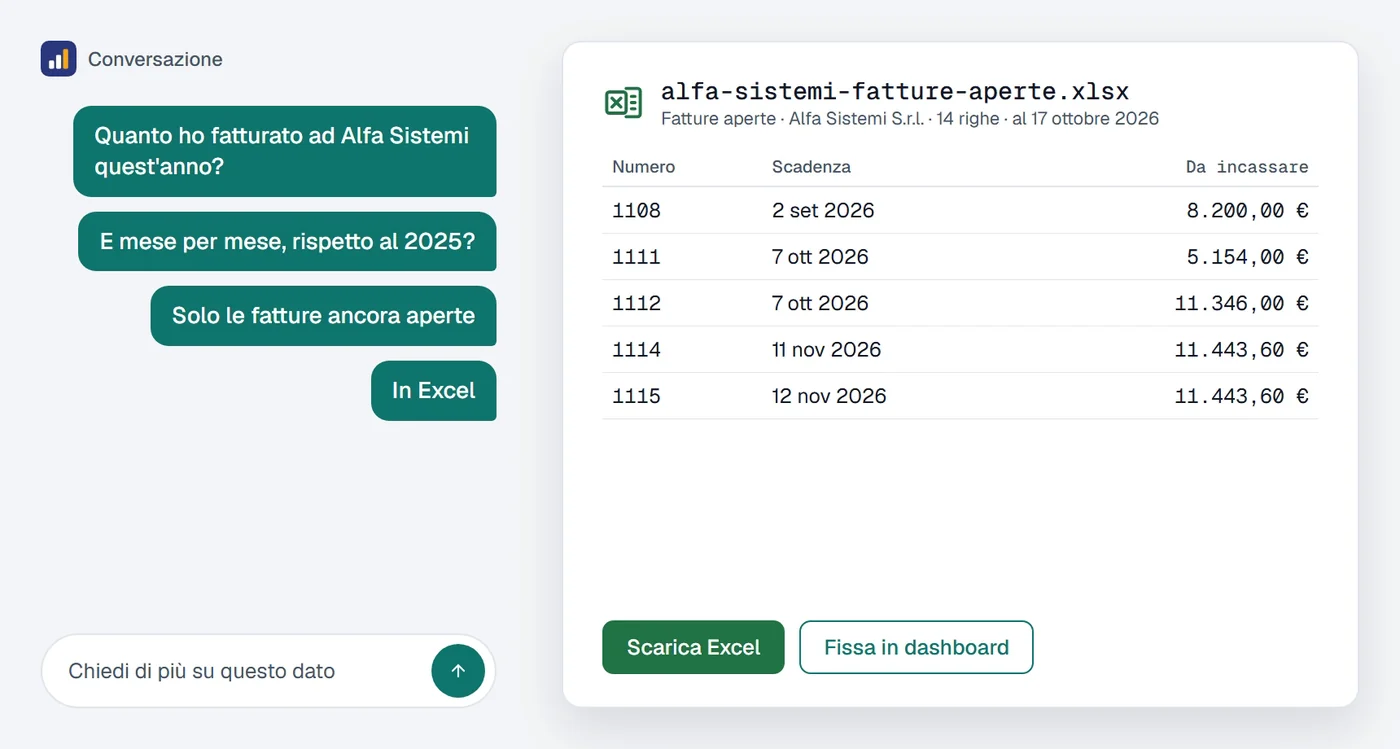
Not every question is answered by a single figure. “This customer’s open invoices”, “customers with address and area who invoiced in 2026”: here the answer is a list, which you read on screen and download as Excel or CSV in one click. No query, no report to prepare, no one to ask.
On the phone too, by voice too
Questions about the numbers don’t wait until you are at your desk. They come between one customer and the next, in the car, in the warehouse. That is why MTF Data Assistant is also an iPhone and Android app: tap the microphone, ask out loud, and the answer arrives with its chart. The dashboard shows the figures pinned from the portal, kept up to date.
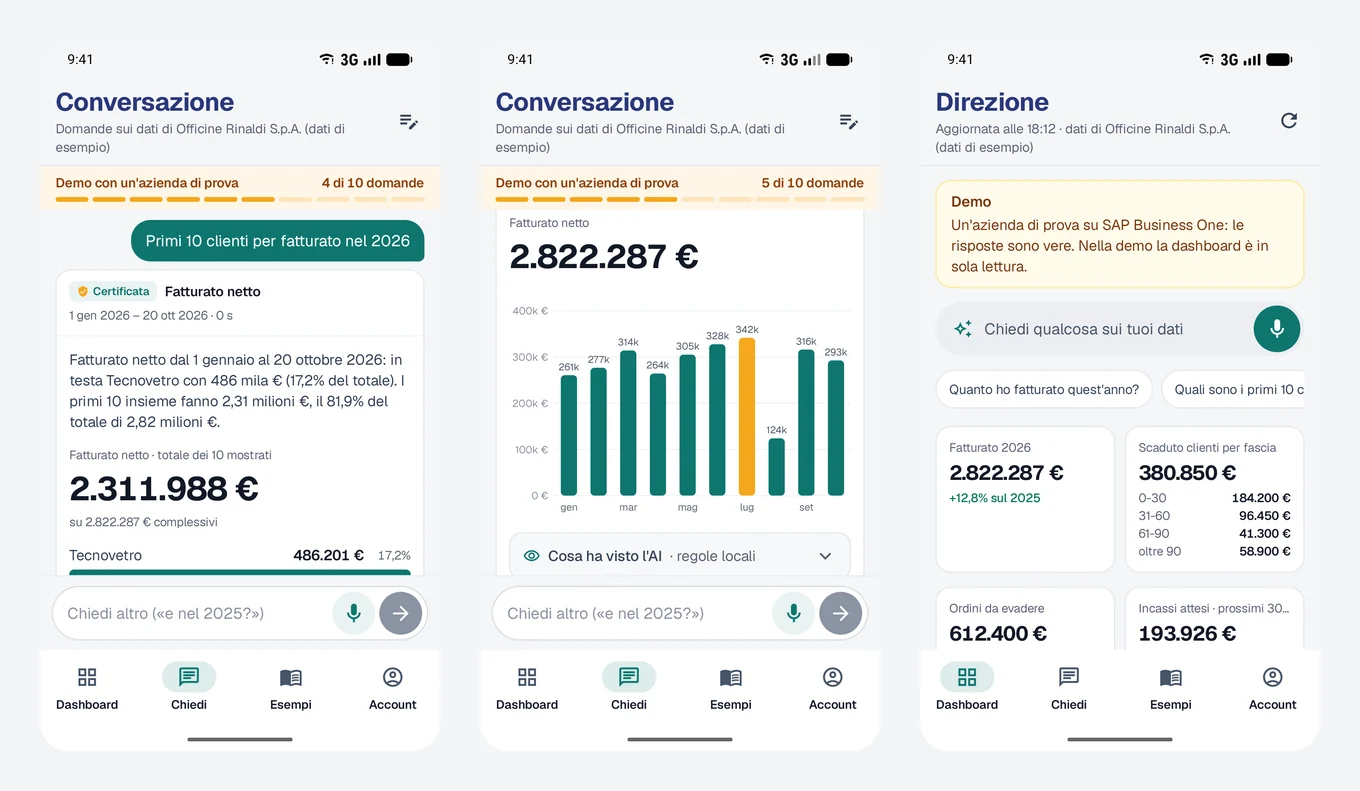
The app is available on the Italian App Store and on Google Play, and you sign in with the same account as the portal.
Where the data goes
The first question people ask us is not “how much does it cost?” but “where does my data go?”. The short answer: it stays where it is.
- A small service runs on the company’s server, the gateway, reading SAP Business One through a read-only database user. If that user could write, the gateway refuses to start.
- The connection goes from the company to us, over HTTPS, never the other way round: no ports to open, no VPN, no inbound access.
- The database password stays on your server, encrypted. MTF does not need it.
- Customer names and document lines never reach the artificial intelligence. Before leaving the company, the customer name becomes CLIENTE_1.
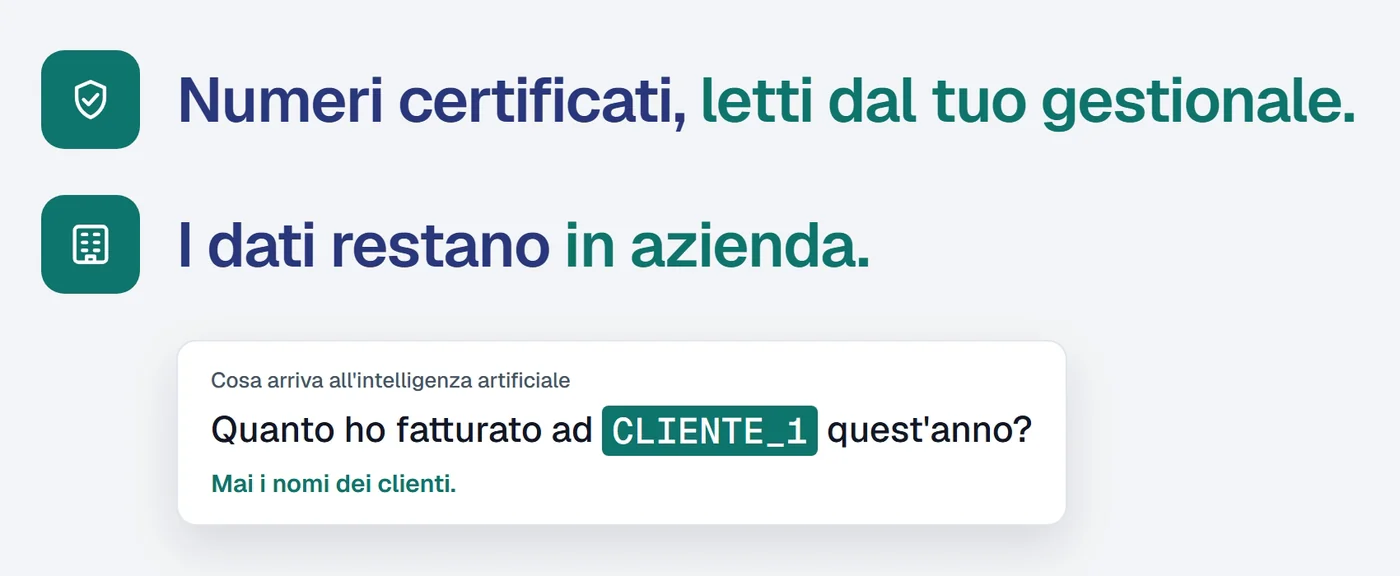
It works with SAP B1 on SAP HANA and on Microsoft SQL Server, including several companies on the same gateway. The full privacy notice is in the portal, before you sign up.
Why you can trust the answer
A wrong figure stated with confidence is worse than no figure. That is why the metrics that matter (revenue, overdue receivables, orders to fulfil, cash) are certified: calculations verified against SAP Business One accounting rules, with credit notes and cancelled documents handled the way the finance team handles them. The artificial intelligence understands the question; the gateway does the calculation, always the same way.
Every answer shows the period and filters it used, and the “Certificata” badge when the metric is one of these. If an answer doesn’t add up, you can see why straight away.
How to try it
- Sign up on the portal with your work email: assistant.mtfapps.com. The trial lasts 30 days, with 100 questions, no credit card.
- Ask your first questions about a sample company, right away, before connecting your own SAP. The answers are real, calculated on a test database.
- Connect your own SAP Business One by installing the gateway on the server: it takes a few minutes, an administrator session and the read-only database user. If you prefer, we install it together with your IT team.
After the trial you choose a plan based on how many questions you ask each month, and activate it from the portal.
Already an MTF customer?
We know your server: we set up the connection together with your IT team, usually in half an hour. If you received our email, just reply to it; otherwise call the consultant who looks after you, or write to us.
Not an MTF customer?
MTF Data Assistant works with any SAP Business One on SAP HANA or Microsoft SQL Server, whoever your partner is. Sign up, try it on the sample data, and when you want to see your own figures your technician installs the gateway, or we do.
Who built it
We built MTF Data Assistant at MTF, where we work on SAP Business One every day for the companies we look after, from dairies to professional firms. It is made in Italy, in Italian, for Italian SMEs. You can also find it on the product page.